NC Editor Panel & Advanced Editing
The NC Editor Panel is the central workspace for editing and refining NC programs.
It allows operators to review, adjust, and validate machining instructions directly within the Shopfloor environment.
Whether performing quick corrections or refining complex toolpaths, the panel provides precise control and immediate visual feedback for every modification.
The editor combines live 3D visualization, intelligent editing tools, and direct machine interaction, enabling both simple adjustments and advanced transformations.
It supports:
- Line-by-line editing of NC commands
- Multi-point transformations for geometry adjustments
- Structured Regshape block editing for complex shapes
- Real-time 3D preview of toolpath changes
- Event attribute editing for modifying machine events
- Direct selection of NC elements from the 3D viewer
- Program validation before applying modifications
All modifications are synchronized in real time with the 3D Viewer, allowing operators to immediately verify the impact of each change.
Before applying changes to the machine program, the NC Editor allows operators to preview the updated toolpath directly in the 3D environment, ensuring safe and accurate adjustments.
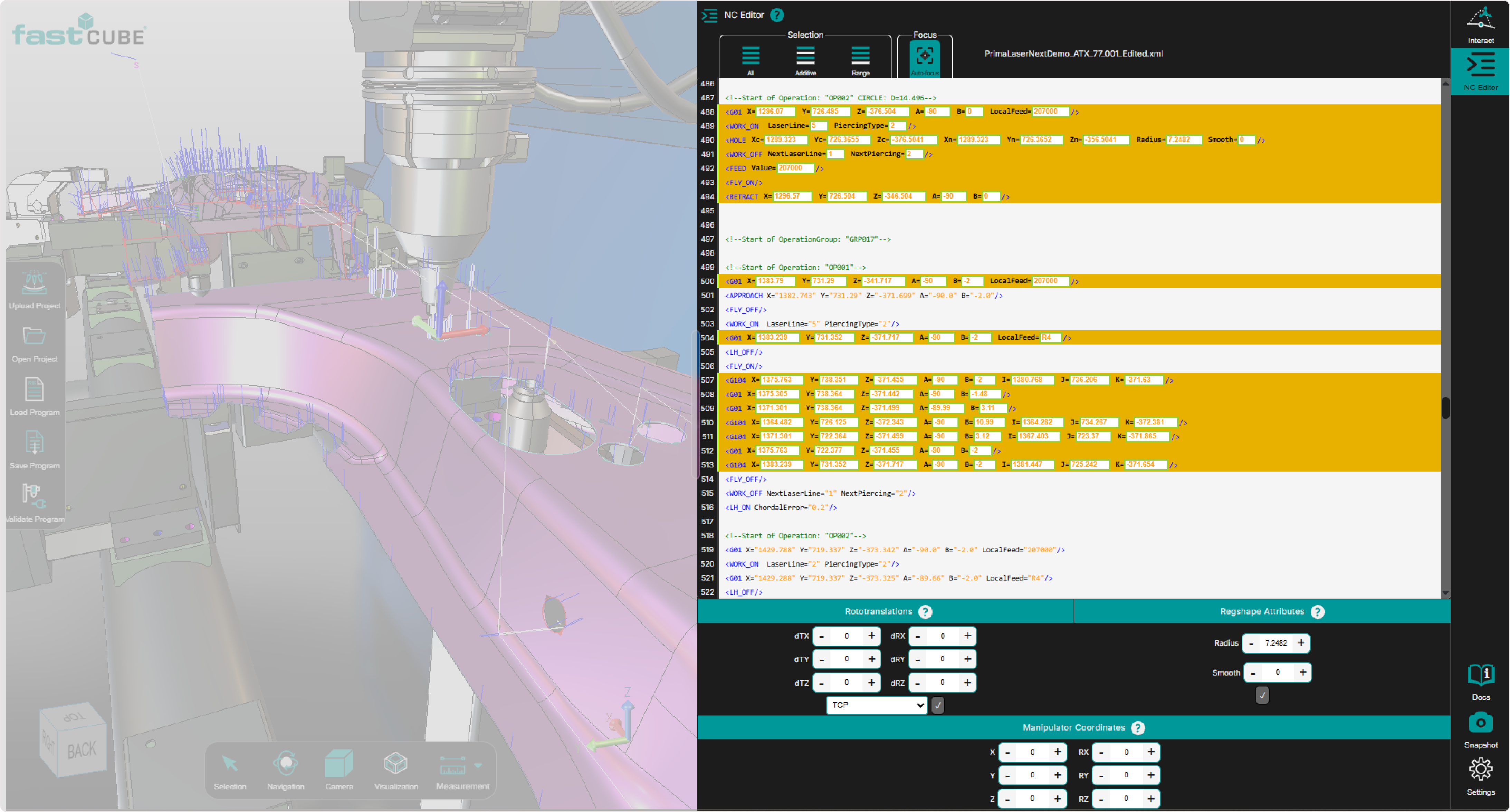
Example of the NC Editor panel for the selected controller.
This chapter guides you through the panel’s capabilities in a clear, practical, and visual manner, helping you make the most of every tool available.