Pattern Recognition
Shopfloor Assistant includes an intelligent pattern recognition system designed to detect structured machining macros such as Regshapes and approach sequences.
Typical recognized features include:
- Holes
- Slots
- Rectangles
- Hexagons
- Keyholes
When these patterns are detected, Shopfloor Assistant automatically groups the associated motion commands into a single logical block.
This allows operators to edit an entire machining feature safely and consistently.
Pattern Structure
Most machining features follow a predictable motion structure.
Pattern recognition identifies and groups these movements automatically.
Lead-in → Approach → Geometry (Hole / Slot / Rectangle / Hexagon / Keyhole) → Retract
Each section represents a logical step of the machining operation.
| Stage | Description |
|---|---|
| Lead-in | Safety move before entering the feature |
| Approach | Movement positioning the tool before cutting |
| Geometry | Main machining path defining the feature |
| Retract | Exit movement leaving the feature |
When one of these elements is selected, Shopfloor Assistant can automatically expand the selection to the complete feature block.
How Pattern Recognition Works
Step 1 — Select a line in the NC Editor
Select a line belonging to a regshape geometry or an approach sequence in the NC Editor.
Shopfloor Assistant analyzes the surrounding commands to determine whether the line belongs to a recognized machining pattern.
Rule 1 — Selecting a Regshape Line
When a line belonging to a regshape geometry is selected, the system automatically selects the entire regshape block.
This includes:
- Lead-in point (if present)
- Approach point (if present)
- Main geometry
- Retract point (if present)
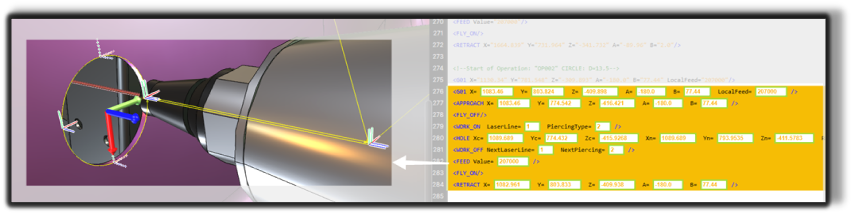
The complete machining feature becomes a single logical selection.
Rule 2 — Selecting an Approach Line
If the selected line is an approach movement immediately before the geometry, the system recognizes it as part of the same machining feature.
In this case, the system automatically selects:
- the lead-in point
- the approach point
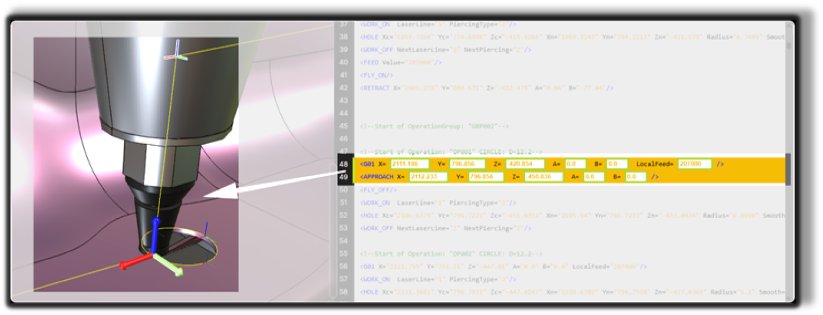
This allows operators to isolate the entry sequence of the feature.
What Happens After Selection
Once the pattern is detected and selected:
- The entire block is highlighted in the NC Editor
- The same movements are highlighted in the 3D Viewer
- All related toolpath commands are grouped for safe editing
At this stage you can apply operations such as:
- Rototranslations
- Regshape attribute modifications
- Block-level transformations
Notes for Operators
- Pattern recognition ensures that complete machining features are edited together, preventing partial edits.
- The system preserves the correct machining sequence:
lead-in → approach → geometry → retract. - Selecting a regshape or approach line automatically highlights all related toolpath movements in both the NC Editor and the 3D Viewer.
- This feature is particularly useful when performing rototranslations, regshape modifications, or block-level adjustments.
- Grouped editing helps maintain consistent toolpath behavior and machining intent.