Recommendations
Python attributes
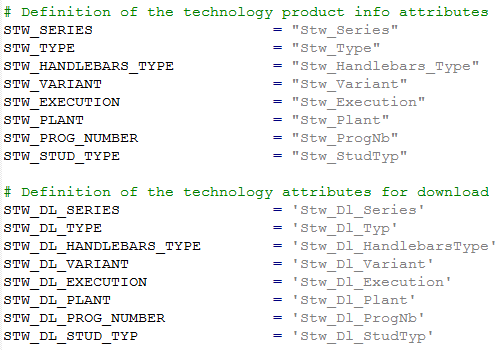
Create new attributes by Python. By default the names of each attribute is defined between the top of the Python file and the first “InitAttrib” method. The below picture shows an example of a process event in Python.
The variables on the left side are used in the whole Python file to create, get or set the value of an attribute.
To have a generic attribute definition, it is recommended to name the attributes by following rule:
| User attribute variable name | <Technology abbreviation>_<Attribute name> e.g. STW_STUD_TYPE |
| User attribute name | <Technology abbreviation>_<Attribute name> e.g. Stw_StudType |
| Download attribute variable name | <Technology abbreviation>Dl<Attribute name> e.g. STW_DL_STUD_TYPE |
| Download attribute name | <Technology abbreviation>DL<Attribute name> e.g. Stw_Dl_StudType |
Down- and upload of process event
A process event is an encapsulated container with information. A typical work flow for the event.
Event Initialize Attribute
- Create process (download) attributes.
Event Process Attributes
-
Read values from user (operation) attribute.
-
Write the value to the process attributes.
Event Compute (optional)
- e.g. create simulation cycle.
This work flow is necessary to be able to upload the event again, because we can only upload events and the event attributes. While uploading the event process attribute function is not called.
Dictionaries
With the plugin manager comes the possibility to create dictionaries for different languages translation. The dictionary supports the definition of attribute and event names, created in Python. It is highly recommended to have at least an English dictionary for the custom defined attributes and events.