Plug-in folder structure
The individual Technology package or ControllerPackage configuration file can be specified for each controller, controller series and model.
The priority of Technology plug-in is defined in the next way:
Series > Manufacturer > Standard
For Technologies algorithm uses first found plug-in with search priority:
1. Plugin\Technologies{name}{Manufacturer}{Series}{Model}
2. Plugin\Technologies{name}{Manufacturer}{Series}\Standard
3. Plugin\Technologies{name}{Manufacturer}\Standard
4. Plugin\Technologies{name}\Standard
For ControllerPackages algorithm uses first found plug-in with search priority:
1. Check in \ControllerPackages{name}{Manufacturer}{Series}{Model}
2. Check in \ControllerPackages{name}{Manufacturer}{Series}\Standard
3. Check in \ControllerPackages{name}{Manufacturer}\Standard
4. Check in \ControllerPackages{name}\Standard
Example:
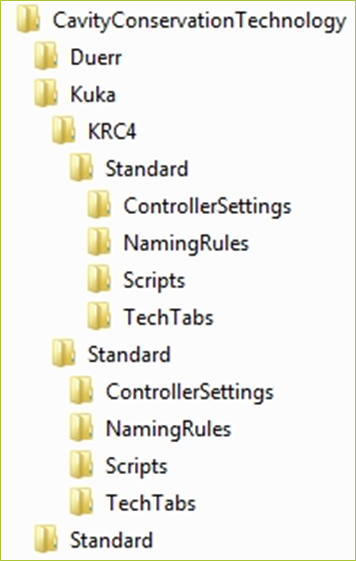
Work cell with two KUKA controllers KRC4 and KRC2 use Cavity Conservation Technology. There are python scripts inside
*“..\Kuka*KRC4*\Standard\Scripts”* and inside
*“..\Kuka*Standard*\Scripts”*:
KRC4 controller will use the python scripts from *“Kuka*KRC4*\Standard\Scripts”*.
KRC2 controller will use the python scripts from the standard Kuka definition folder *“Kuka*Standard*\Scripts”*.
Example of plug-in folder structure:

Plug-in requires Settings.xml file located in “ControllerSettings” folder.

Python scripts are located in “Scripts” folder.
