General Call
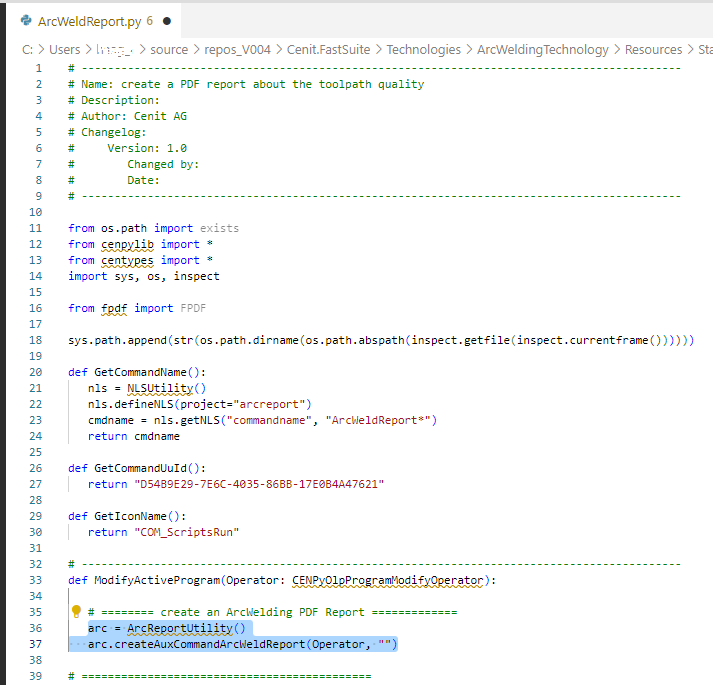
Calling the method ModifyActiveProgram from a Python script will initiate the creation from the Auxiliary Commands.

Auxiliary commands script content
The script should contain, beside some general settings, a method called ModifyActiveProgram.
From this method the report creation can be called.
First, initialize a member of the ArcReportUtility (arc = ArcReportUtility()), which gives you access to the methods of the class.
Then the command can be executed:
arc.createAuxCommandArcWeldReport(Operator, "")
The report is created with its default settings.
Auxiliary commands execution
How to proceed the Arc welding PDF Report creation using the Auxiliary Commands:
Open the Programs dashboard in the OLP workbench.
Right mouse button into the programs list and select the pie menu Run auxiliary commands option.
Select the Arc Welding Report in the upcoming window.

Report file location
The report will be stored at the same location as defined for the download.

A desired folder can be set in the caller script by calling function setDownloadFolder with the desired folder:
e.g. arc.setDownloadFolder("C:\Store\Temp")