General call
Base
This class can be embedded in every Python script.
An import from cenpylib import * has to be done.
Define a member of the class in the method nls = NLSUtility() and you have now access to the methods and functions of the class.

Initializing the NLS translation
To get the NLS Translation available in your Python script, you have to define different settings by calling the defineNLS() Method.
It provides several parameters for getting the desired translation.
defineNLS( language, project, alternativePath )
Parameter language : can be set with the usual E2 languages english “EN”, german “DE”, french “FR”, chinese “CN”, japanese “JP”
If left empty "" the class tries to get the OSystem lanuage and link to this language. Default is english “EN”
Parameter project : a desired name for the translation files can be set. If left empty "", by default “common” will be use.
Means, that the class is searching for translation files with the desired name (or “common”)
The file naming convention is [name].[language].lng, e.g. report.fr.lng
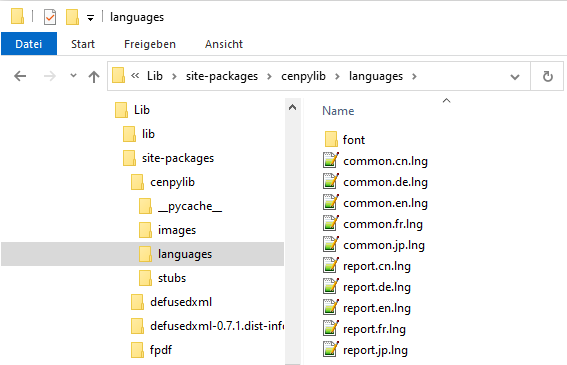
Parameter alternativePath : by default the class searches for language files in the E2 installation cenpylib folder, subfolder languages.
If customized files needed, no matter if already existing in the cenpylib folder or complete new ones, a path to a desired PlugIn can be defined.
defineNLS() : no Args : get language from OS, Project “common”, NLS in cenpylib\languages
defineNLS(language) : only language Arg : desired language, Project “common”, NLS in cenpylib\languages
defineNLS(altpath=“yourpath”) : only path Arg : get language from OS, Project “common”, NLS in altpath & cenpylib\languages
defineNLS(language, altpath=“yourpath”) : language & path Arg : desired language, Project “common”, NLS in altpath & cenpylib\languages
defineNLS(language, project) : language & project Arg : desired language or empty ""=OS, Project with desired Name, NLS in cenpylib\languages
defineNLS(language, project, altpath) : language & project Arg : desired language or empty ""=OS, Project with desired Name, NLS in altpath & cenpylib\languages
defineNLS(project=“yourproject”, altpath=“yourpath”) : language=OS, Project with desired Name, NLS in altpath & cenpylib\languages
Note : be aware that in some cases the parameter description (altpath=”…”) might be needed
Default location of translation files :
Getting the translated item
To get the desired item as a string back, this method will be used :
def getNLS(name, default):
Parameter name : the desired item name in the translation file
Parameter default : a default string that will be used if the item was not found. Optional, if not set, the parameter name is taken as default
The string read from the NLS file or the default will be returned

Replace a placeholder in a string
It might be possible to set placeholders into a translation string, which should be replaced by any variable part, e.g. a default file name with the program name.
In this case you can add a unique set of characters to the translation and let these unique set of characters replace by the desired program name in the returned translation.
def replaceNLS(instring, searchstr, replacestr):
Parameter instring : the string containing the to be replaced placeholder
Parameter searchstr : the unique set of characters to be replaced
Parameter replacestr : the string that will replaces the searchstr
The string with the replaced section will be returned
Example:
